Dasaria Minecraft Tutorial
Install mods and join multiplayer easily with this step-by-step guide
1. Download & Install TLauncher
Go to TLauncher.org and download it for your operating system. No need to install Java separately, there is an option inside TLauncher Installer.
2. Create Account & Choose Version
Register or log in to TLauncher. Then, Choose this version:
- Fabric 1.21.5 (8GB+ RAM)
- Forge 1.21.5 (4GB RAM or lower)
You can just input your username or create a TLauncher account by following the video below
3. Install Simple Voice Chat Mod
- Open ⚙️ Settings in TLauncher
- Create new modpack
- Add Simple Voice Chat
- Launch using your modpack
4. Enter the Game
Launch Minecraft and wait until the main menu appears.

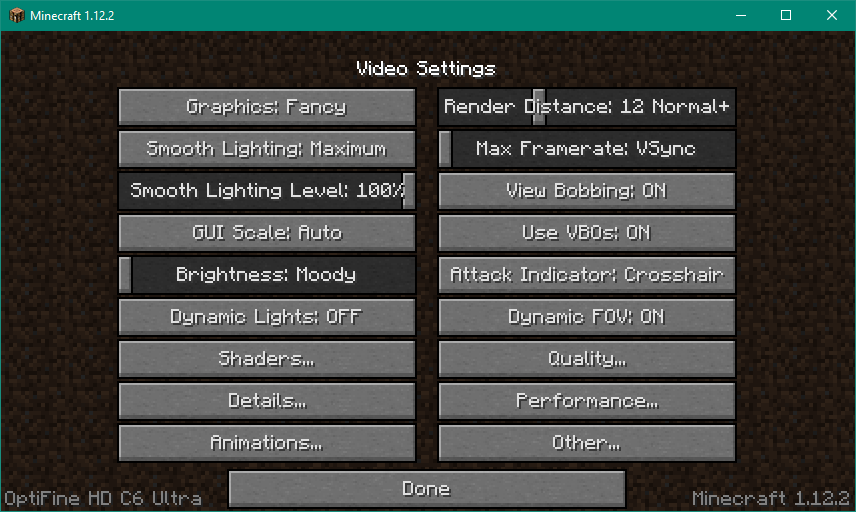
5. Configure Settings
- Options → Video Settings
- Enable Fullscreen
- Set GUI Scale to
2 -
In Controls → Key Binds, set voice chat
key (e.g.,
V)
6. Join Multiplayer Server
-
Server Name:
Diata Server -
Server Address:
minecraft.diata.my.id
Click Done, then Join Server.

7. Done!
Enjoy playing Minecraft with your friends, with mods and voice chat enabled! 🎉
Additional
Following this instructions if you want: